

Posture Correction for Desk and Office Work
Posture correction rests on an assumption the evidence does not support: that one specific alignment is correct and that others cause harm. Studies comparing posture with pain find weak and inconsistent links, and people with markedly unusual postures frequently have no symptoms at all. What consistently causes trouble is holding any position for too long.
That reframes the task. Instead of holding a single ideal position for eight hours, the aim becomes changing position often and building enough strength that upright positions are not tiring to sustain. A reminder every half hour does more than an expensive chair. A position that is difficult to maintain usually indicates a strength limitation rather than a lapse of discipline.
Posture correction for desk and office work therefore focuses on habits: how long one position is held, how the desk is set up, and whether the muscles can hold an upright position without tiring. The same principles apply behind the wheel and over schoolbooks.
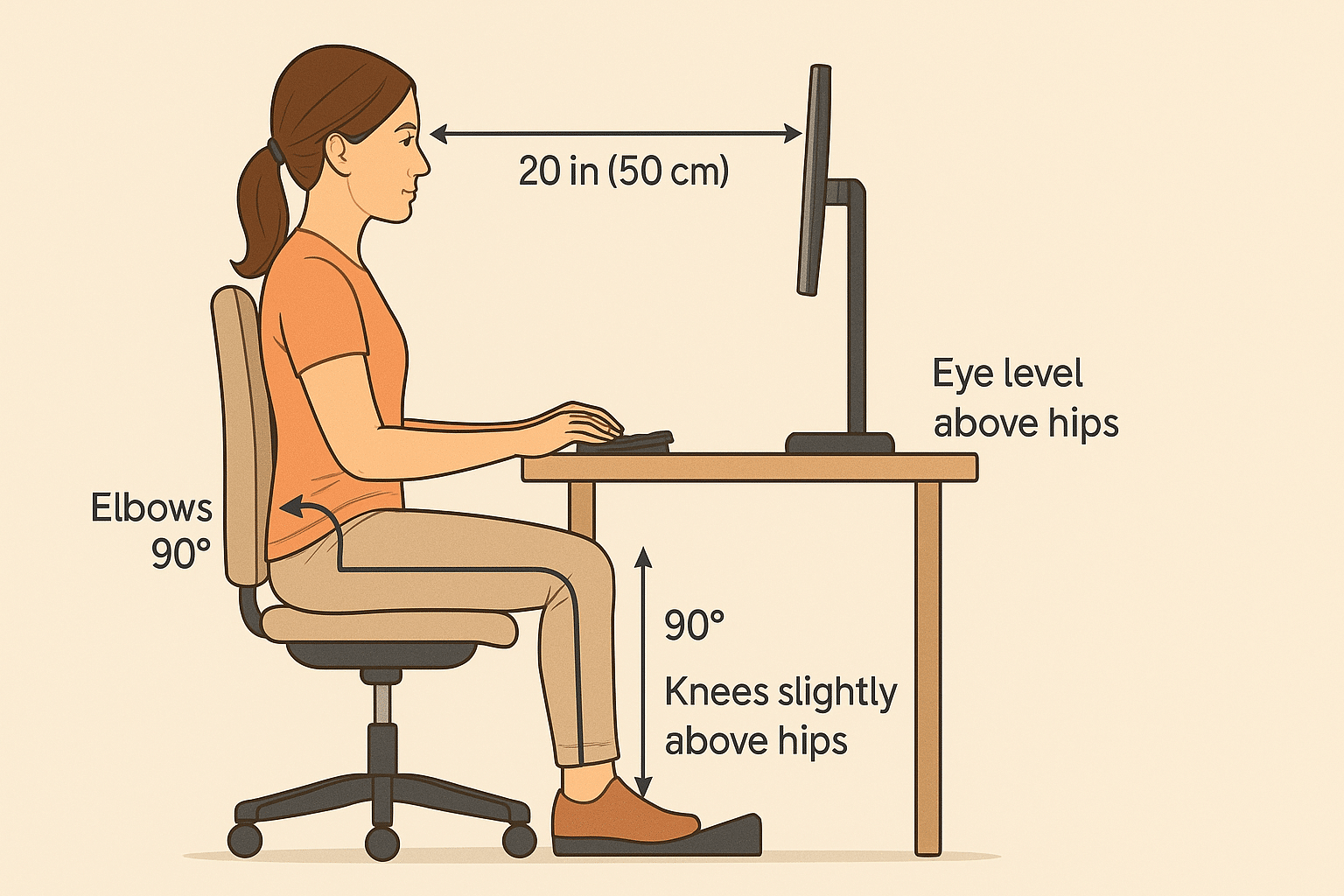
Long periods of slouching load the discs, ligaments and joints of the spine, and slumped sitting also reduces how fully the lungs fill (Lin 2006). For office workers, small adjustments such as setting the screen at eye level, keeping the elbows near 90° and using a footrest reduce that load.
For children and teenagers, study posture matters too, because desk habits formed early tend to carry into adulthood. The sections below cover practical, non-invasive changes at the desk, at home and in the car.
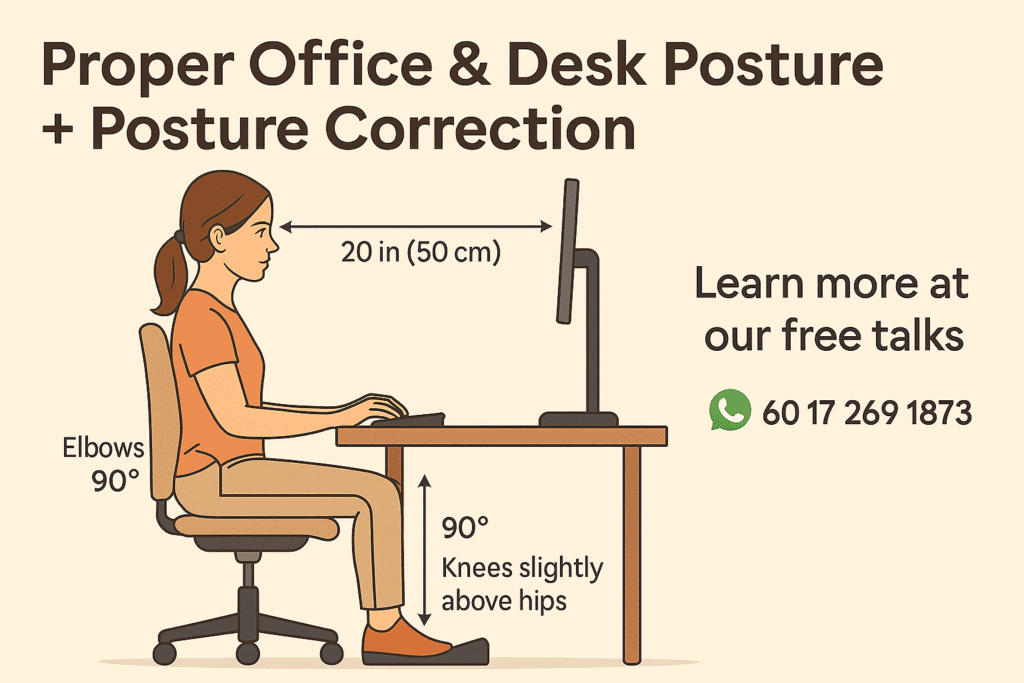
This guide to posture correction for desk and office work, and what proper posture means, is published by Chiropractic Specialty Center, Bukit Damansara (KL) main center: WhatsApp+60 17 269 1873 Call+603 2093 1000
Posture Guidance From CSC
The Desk Posture Mistakes video covers the practical side: the chair, the screen, the keyboard and mouse, and the movement breaks Yama Zafer, D.C., uses himself, with a phone timer every 30 minutes.
CSC also holds posture health talks in Kuala Lumpur from time to time; they are paused at the moment, so for the next date, send a WhatsApp message to the Bukit Damansara main center at +60 17 269 1873.
Why Posture Correction Care Matters
Posture correction care looks at how load is shared across the spine. Holding a slumped or forward-leaning position for long periods strains the spine, and over time that strain may contribute to changes such as:
- Ligament thickening
- Increased spinal disc pressure
- Joint instability
Sitting also loads the lower back more than standing: in a study of two hours of sitting, the compressive load on the lower back averaged about 1,700 N in sitting against about 1,080 N in standing, and the authors noted that both positions, held without movement, give the back little rest (Callaghan 2001). That is why changing position matters more than any single posture.
Key Takeaways for Posture Correction at a Desk
- Holding any position too long is the main problem: changing position often matters more than finding one perfect posture.
- Desk setup matters: Screen at eye level, elbows at 90°, feet flat (or on a footrest), and pelvis supported to prevent sagging.
- Sitting loads the lower back more than standing: standing up regularly gives the back a change of load.
- Children and teenagers need good habits early: a well-set study desk and a backpack kept to about 10-15% of body weight help limit strain.
- Movement is non-negotiable: Micro-breaks and stretches every 30-60 minutes help reset posture and reduce cumulative stress.
How Sitting Posture Affects Breathing
The clearest measured effect of sitting posture beyond the spine is on breathing. In a study of 70 volunteers, slumped sitting lowered lung capacity and expiratory flow compared with normal upright sitting, and it also flattened the curve of the lower back (Lin 2006).
Upright sitting with the pelvis supported, and short breaks to stand, keep the chest and the lower back in a better position through the working day.
What Is Proper Posture? (Quick Definition & Benefits)
Proper posture is often described as the body’s ability to maintain its natural alignment with minimal stress on muscles, ligaments, and joints. In simple terms, it means your spine keeps its natural curves, your shoulders stay relaxed, and your head rests above the body instead of shifting forward. This balance allows your muscles to share the workload efficiently and reduces unnecessary pressure on spinal discs and joints (Neumann, 2016; Kendall et al., 2005).
A balanced position also needs less muscle work to hold, which is one reason an upright position that is hard to keep usually points to a strength limitation.
Two practical benefits stand out:
- Easier breathing: the chest has more room to expand than in slumped sitting.
- Less muscle effort: the muscles share the work of holding the position instead of fighting a slump.
Seat & Pelvis Support (avoid posterior pelvic sag)
Sit all the way back in your chair so the backrest supports your pelvis around belt level. This prevents your lower back from “sagging” and keeps your spine in a safer, more upright position. If your chair is too big and the seat touches the back of your knees, it’s not the right fit.
Elbows & Forearms at ~90° (desk height alignment)
Adjust your chair so your elbows rest comfortably at about a 90° angle when your forearms are on the desk. This keeps your shoulders relaxed and prevents hunching or shrugging while typing or using a mouse.
Knees, Feet & Footrest (heels down, knees ≈ hip level)
Keep your knees close to hip height or just slightly higher, with your heels resting flat on the ground. If your feet don’t reach the floor, use a footrest. This maintains circulation and avoids extra strain on the lower back and thighs.
Keyboard, Mouse & Wrist Position (close reach, neutral wrist)
Keep your keyboard and mouse within easy reach so your elbows stay close to your body. Your wrists should remain straight, in line with your forearms. If your palms feel sore, rest them on something soft at the base of the palm not across the wrist itself.
Screen Height & Distance (eyes to screen center, ~50-70 cm)
Place your monitor about an arm’s length away usually 50-70 cm. Your eyes should naturally fall near the center of the screen, not the top edge. If the screen is too high, you’ll strain your eyes; too low, and your neck starts to bend forward.
Laptops & Dual Monitors (elevate screen, external KB/mouse)
Using a laptop? Raise it with a stand or stack of books so the screen is at eye level, then connect a separate keyboard and mouse. With two monitors, position the main one directly in front of you. If you use both equally, place the join between the two in the center of your view.
Phones, Headsets & Accessories (hands-free, reduce cradling)
Avoid holding your phone between your ear and shoulder it strains the neck and upper back. Use a headset or speaker mode instead. Keep accessories like pens, notepads, or even water bottles within reach to reduce awkward twisting or reaching.
Micro-Breaks & Desk Stretches (every 30-60 minutes)
Set reminders to check your posture and stand up every 30-60 minutes. Even a quick walk to refill your water, stretch your shoulders, or roll your ankles helps reset your body. Use phone calls as an excuse to move instead of staying glued to the chair.
Correcting Sitting Posture

- Sit on the sitting bones rather than rolling back onto the tailbone (coccyx).
- Keep the upper buttocks and the shoulders against the back of the chair for support.
- Keep the knees at about 90 degrees so the weight is shared through the thighs and feet.
- Keep the feet flat on the floor or on a footrest.
- Change position regularly rather than holding one posture for hours.
Posture for Students & Teenagers (Study Desk & Backpack Fit)
Good posture habits start young, and school settings often play a big role. Long hours of sitting at desks, carrying heavy backpacks, and using laptops or tablets can all affect spinal health and muscle balance in children and teens. Improper sitting and poorly adjusted school furniture may increase the risk of spinal strain and long-term postural changes in adolescents.
When it comes to study desks, the same rules apply as for adults: the screen should be around eye level, chairs should allow feet to rest flat or on a footrest, and elbows should bend close to 90°. Encouraging students to sit back in their chairs with their pelvis supported can help reduce slouching, which is linked to musculoskeletal pain.
Backpack use is another key factor. Many guidelines suggest keeping a backpack under about 10-15% of body weight, because heavier loads can contribute to postural asymmetry and back strain. A well-fitted backpack should rest evenly across both shoulders, with padded straps adjusted snugly, and the bottom sitting no lower than the waistline. Wearing a backpack on one shoulder or letting it hang too low shifts weight unevenly and strains the spine over time.
Teaching students these simple habits, balanced sitting at study desks and proper backpack fit, can help reduce early postural stress and set the foundation for healthier spinal alignment into adulthood.
Study Desk Setup
Students should sit with their back supported against the chair, hips slightly higher than the knees, and feet flat on the floor or a footrest. The desk height should let elbows bend close to 90°, with shoulders relaxed, not hunched. Books, laptops, or tablets should be raised so the eyes fall near the center of the screen or page to discourage slouching.
Backpack Weight & Straps
A backpack should be light enough to carry comfortably ideally less than 10-15% of body weight. Both shoulder straps should be used, with the pack snug against the back and sitting no lower than the waist. Wide, padded straps spread weight evenly and reduce pressure on the shoulders and spine.
Screen-Time Habits & Breaks
Too much screen time encourages slouching and forward-head posture. Students should take short breaks every 30-45 minutes to stretch, stand, or walk. Positioning screens at eye level and keeping them at arm’s length helps reduce strain on the neck, shoulders, and eyes.
Posture at Home & Everyday Activities (Sofa, Reading, Lifting)
Relaxing at home often leads to slouching on the sofa, craning the neck while scrolling on a phone, or lifting household items with poor form. Over time, these habits place stress on the spine and joints. A supportive sofa cushion or lumbar pillow can encourage upright sitting. When reading, keep the book or tablet elevated to eye level instead of looking down for long periods. For lifting whether it’s groceries or laundry bend at the knees and hips, not the waist, and keep the object close to your body. Small adjustments like these help protect the spine and reduce unnecessary strain.
Posture in the Car (Seat, Headrest, Entry/Exit Tips)
Driving posture matters just as much as sitting at a desk. Adjust the seat so your hips are slightly higher than your knees, and sit close enough that elbows remain slightly bent while holding the wheel. The headrest should meet the middle of the back of your head, not the neck, to reduce stress on the upper spine. Avoid slumping by keeping your back in contact with the seat. When getting in or out of the car, pivot your whole body instead of twisting at the spine. These small changes make long drives safer and more comfortable.
How Poor Posture Affects Spinal Mobility & Neuromuscular Function
Slouched or uneven posture alters how the spine, muscles, and joints share load. Over time, this can reduce flexibility and change the way muscles fire, leading to inefficient movement patterns. Holding a slumped position places extra strain on spinal discs and ligaments, which may contribute to stiffness, weakness or instability. Changing position often and strengthening the muscles that hold an upright position share that load more evenly.
Spinal Discs & Posture: Loads by Position (Sitting, Standing, Bending)
Spinal discs act as shock absorbers between the vertebrae, and the load on them changes with position. Lying down unloads them most; sitting loads the lower back more than standing, and leaning forward adds to that load, which is why long hours slumped over a desk are hard on the discs.
This explains why desk posture and prolonged sitting play such a big role in disc health. Even small improvements, like using lumbar support, keeping knees near hip level, and avoiding slouching can reduce unnecessary pressure.
Ligament & Facet Joint Adaptations from Prolonged Poor Posture
Ligaments and facet joints are designed to stabilize the spine during movement, but poor posture can trigger long-term changes. Prolonged flexed or slouched sitting increases ligament strain, potentially leading to thickening (hypertrophy) over time. This adaptation may reduce flexibility and crowd the spinal canal (spinal stenosis), influencing nerve function.
Facet joints, which guide spinal motion, can also respond to chronic stress by enlarging or thickening. These degenerative adaptations may limit mobility, alter load distribution, and contribute to stiffness in neck or lower back issues, where it can cause acute or chronic back pain.
Ligamentum Flavum Hypertrophy (mechanics & implications)
The ligamentum flavum helps maintain upright posture and prevents excessive spinal motion. However, when exposed to long periods of poor posture and repetitive strain, it may thicken. Hypertrophy of this ligament is closely linked with spinal stenosis, as the thickened tissue reduces space within the spinal canal. Not everyone develops symptoms, and good posture habits and regular movement may lower that load over time.
Facet Hypertrophy (mobility & joint stress)
Facet hypertrophy occurs when the small stabilizing joints at the back of the spine enlarge under prolonged mechanical stress. This adaptation is often seen with chronic poor posture and uneven load sharing. Over time, enlarged facets may limit spinal flexibility and increase joint stress during movement. Encouraging better posture, mobility exercises, and non-invasive rehab strategies may help protect facet health and function.
Arranging a Posture Assessment in KL
A posture assessment looks at how the spine moves and how strong the muscles that hold it are, and it reviews the desk, car and study setup that the day is spent in. Chiropractic and physiotherapy are then combined in one plan. Either Kuala Lumpur center can arrange it:
- Bukit Damansara (KL, main center): Call +603 2093 1000 or WhatsApp +60 17 269 1873. Directions are on the Bukit Damansara contact page.
- Bandar Sri Damansara (KL): Call +603 6262 5777 or WhatsApp +60 12 455 6939. Directions are on the Bandar Sri Damansara contact page.
FAQs on Posture Correction & Proper Sitting Posture
Why is posture correction important?
Holding any position too long loads the discs, joints and ligaments of the spine, so posture correction focuses on changing position often, setting up the desk well and building the strength to hold an upright position without tiring. Upright sitting also lets the lungs fill more fully than slumped sitting.
What is a good sitting posture for desk work?
A good sitting posture keeps the pelvis supported against the backrest, the elbows bent near 90° at desk height, the feet flat on the floor (or on a footrest), and the screen centered at eye level about 50-70 cm away. It reduces spinal load, discourages slouching and helps keep the natural curves of the spine.
How does poor posture affect spinal discs?
Disc load changes with position: it is lowest lying down, higher in sitting than in standing, and higher again when leaning forward. Holding those loaded positions for hours adds to the strain on the discs, ligaments and facet joints, which is why regular breaks matter.
Does posture influence organ function?
Its clearest effect is on breathing: slumped sitting reduces lung capacity and expiratory flow compared with upright sitting (Lin 2006). Effects on other organs are less clear.
What are the most common posture mistakes at work?
The most common posture mistakes include slouching forward, crossing legs for long periods, letting the pelvis sag in the chair, reaching too far for the keyboard or mouse, and keeping screens too high or too low. Each of these increases strain on the spine, muscles, and joints.
How can students and teenagers improve posture?
Students should sit with their back supported, elbows at 90°, and feet flat or on a footrest. Backpacks should weigh no more than 10-15% of body weight, worn over both shoulders, and sit above the waistline. Regular breaks from screens and stretching also help protect growing spines.
What are simple daily habits to improve posture?
Take micro-breaks every 30-60 minutes to stand, stretch, or walk. Keep your pelvis back in the chair, monitor at eye level, and wrists in line with forearms while typing. At home, use lumbar pillows on sofas, raise reading material to eye height, and lift objects by bending knees, not the waist.
Peer-Reviewed References
- Brackley HM, Stevenson JM. Are children’s backpack weight limits enough? A critical review of the relevant literature. Spine. 2004;29(19):2184-2190.
- Callaghan JP, McGill SM. Low back joint loading and kinematics during standing and unsupported sitting. Ergonomics. 2001;44(3):280-294.
- Cardon G, De Clercq D, De Bourdeaudhuij I, Breithecker D. Sitting habits in elementary schoolchildren: a traditional versus a “Moving school.” Patient Educ Couns. 2004;54(2):133-142.
- Cook G. Movement: Functional Movement Systems: Screening, Assessment, Corrective Strategies. On Target Publications; 2010.
- Kendall FP, McCreary EK, Provance PG. Muscles: Testing and Function with Posture and Pain. 5th ed. Lippincott Williams & Wilkins; 2005.
- Levangie PK, Norkin CC. Joint Structure and Function: A Comprehensive Analysis. 5th ed. F.A. Davis Company; 2011.
- Lin F, Parthasarathy S, Taylor SJ, Pucci D, Hendrix RW, Makhsous M. Effect of different sitting postures on lung capacity, expiratory flow, and lumbar lordosis. Arch Phys Med Rehabil. 2006;87(4):504-509.
- Negrini S, Carabalona R. Backpacks on! Schoolchildren’s perceptions of load, associations with back pain and factors determining the load. Spine. 2002;27(2):187-195.
- Neumann DA. Kinesiology of the Musculoskeletal System: Foundations for Rehabilitation. 3rd ed. Elsevier; 2016.
- Page P, Frank CC, Lardner R. Assessment and Treatment of Muscle Imbalance: The Janda Approach. Human Kinetics; 2010.
- Sahrmann SA. Diagnosis and Treatment of Movement Impairment Syndromes. Mosby; 2002.
These references and textbooks describe posture, sitting load, breathing and school posture in general. None of them evaluates care at Chiropractic Specialty Center.
The Author of Posture Correction for Office and Desk Work: A Guide
Posture Correction for Office and Desk Work: A Guide was written by Yama Zafer, D.C., who has 30+ years in chiropractic and physiotherapy and founded Chiropractic Specialty Center in Kuala Lumpur in 2006.
Last Updated: Posture Correction for Desk and Office Work
Posture Correction for Desk and Office Work was last reviewed and updated on October 4, 2026.